Turn your Google Search Console data into an SEO audit you can act on.
SearchTriage analyses your Google Search Console exports and site context, then gives you a prioritised plan for what to write, update, link, fix, or ignore.
It is a search-performance and content audit built from your own data, not a generic technical site score.
No ranking promises. No automatic site changes. Every recommendation is tied to your own GSC evidence.
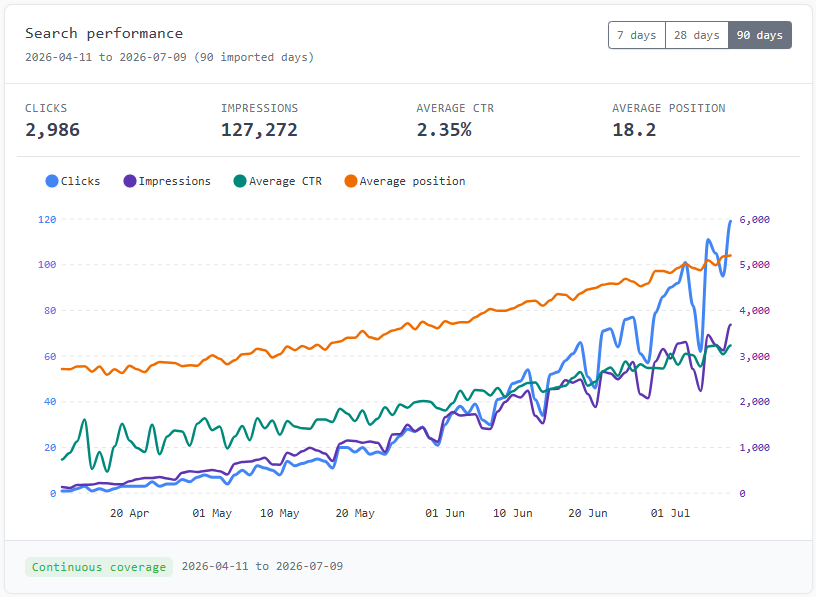
Google is already testing your site. See what to do next.
Search Console shows clicks, impressions, CTR, position, queries, and pages. SearchTriage audits the patterns between those numbers and prioritises the work most likely to be worth your time.
Every useful finding leads to one of five practical decisions.
Find useful queries that your existing content does not answer clearly.
Find pages with traction that need stronger titles, answers, sections, or search-intent alignment.
Find related pages that should be supporting each other with useful internal links.
Find weak CTR, unclear search packaging, or the wrong page ranking for a useful query.
Set aside tempting searches that do not fit your audience, offer, or publishing priorities.
See the opportunities hidden inside your GSC data.
The most useful signals rarely sit in one column. SearchTriage looks at the relationship between queries, pages, clicks, impressions, CTR, and average position.
Each pattern is considered alongside your site context and known URLs before it becomes a recommendation.
Content gaps
Queries Google is testing you for, but your site does not answer clearly yet.
Learn how to review this signalStriking-distance pages
Pages close to useful rankings that may respond to a focused improvement.
Learn how to review this signalIgnore signals
Tempting queries that would waste your publishing time.
Learn how to review this signalSearch-performance evidence, not another generic website score.
Technical crawlers are valuable for finding implementation and site-health problems. SearchTriage answers a different question: what should you do with the searches Google is already showing your site for?
The two approaches complement each other. SearchTriage focuses on content, CTR, page fit, internal links, and publishing priorities.
See how SearchTriage uses AI in the audit| Traditional technical audit | SearchTriage GSC audit |
|---|---|
| Starts with a site crawl and technical checks | Starts with imported GSC performance and site context |
| Produces a technical issue checklist | Prioritises decisions tied to real queries and pages |
| Supports site health and implementation QA | Supports content, CTR, page-fit, and internal-link decisions |
| Helps teams investigate and fix site issues | Helps users review, accept, reject, or defer recommendations |
Every SEO recommendation should have a reason.
SearchTriage connects each recommendation to the query, page, clicks, impressions, CTR, position, and site context behind it. You can review the evidence before deciding what happens next.
Explore the recommendation modelImport Google Search Console files
Upload the CSV, ZIP, or XLSX files exported by Google Search Console.
Review a prioritised action queue
See the priority, confidence, source evidence, and recommended next step for each audit finding.
Turn decisions into useful output
Move accepted opportunities into reports, SEO-led briefs, review-ready drafts, page update instructions, and client notes.
Keep the ignore list
SearchTriage explains why some queries are the wrong audience, too broad, already covered, or better deferred.
See how search data becomes an action.
SearchTriage connects the query, ranking page, performance signal, and site context so you can understand and defend the next step.
| Query | "best onboarding checklist for freelancers" |
|---|---|
| Ranking page | /pricing |
| Signal | 380 impressions, low CTR, average position 18 |
| SearchTriage decision | Create a support-style article and link it back to the pricing page. |
| Why | Google is testing the site for an informational query, but the current page is commercial and does not answer the question directly. |
Example only. SearchTriage uses your own GSC exports and site context to generate recommendations.
See how the full SEO report is organisedOne audit workflow, shaped for different sites and teams.
The same GSC metrics mean different things for a SaaS product, client portfolio, service business, or editorial site.
SaaS founders
Feature pages, comparisons, onboarding questions, support gaps, and product-fit searches.
Explore this use caseAgencies
Client-ready audits, action queues, briefs, ignore decisions, and white-label handoff.
Explore this use caseSmall businesses
Service-page updates, FAQs, local queries, customer questions, and poor-fit searches.
Explore this use caseContent sites
Editorial priorities, page refreshes, content gaps, internal links, and noisy topics.
Explore this use caseBuilt for people who need clearer search decisions.
For the moment when Search Console has plenty of data, but the next content decision still is not obvious.
SearchTriage turned a messy GSC export into a short list of pages to update, articles to write, and searches to ignore. That's exactly what I needed!
The useful part is the judgement. It doesn't just say "make more content"; it explains when an update, internal link, or ignore decision is the right move.
I can finally see which queries are signals and which are noise. The ST briefs give me enough structure to publish without starting from a blank page.
Run a GSC SEO audit in six clear steps.
Add your site context, bring in fresh GSC data, review the evidence, and turn the strongest findings into useful work.